REACH ME
(+381 ) 65 - 265 - 8527
HI@DEVMILOSH.COM
MY RESUME

Four years ago, I did my first paid Webflow audit. The client was a small SaaS company in Belgrade — they had a Webflow marketing site, traffic was decent, conversions were flat, and they wanted to know why.
I spent four hours on it. Opened DevTools. Ran PageSpeed. Scrolled through every page on mobile. Took notes in a Google Doc. Wrote it up as a list of 14 issues, color-coded the ones that seemed serious in red, and sent it over.
The client read it, said thanks, and asked one question:
"Okay — but what's urgent?"
I sat there staring at my own document and realized I didn't know how to answer. I'd noticed the issues. I hadn't ranked them. I hadn't quantified business impact. I hadn't connected any technical finding to revenue, conversion, or compliance. I'd done the work but I'd packaged it like a favor.
The audit was technically thorough. But it didn't tell the client what to do next. So they did nothing. And I'd charged €120 for a document that produced zero outcomes.
That was the moment I understood that an audit isn't a list of problems. An audit is a decision-making tool. The work isn't finding the issues — finding issues is easy. The work is helping a non-technical decision-maker understand which issue, if fixed first, returns the most value.
This guide is the system I built over the next four years. It's what I wish someone had handed me before that first €120 audit.
Most Webflow freelancers I talk to do audits the same way I did at the start: open the site, scroll, spot issues, write a doc, send it. The results are predictable — clients are polite, occasionally implement one or two fixes, and almost never come back for more work. The audit becomes a one-off line item instead of an entry point to a relationship.
Three things changed when I started charging €500+:
The work didn't change. The system did.
Every audit covers six categories. Each is run in this order — and the order matters. Skipping or reordering creates blind spots.
SEO is where most audits start because it's where most freelancers feel most confident — but it's also where the cheapest wins live. Get these right and you justify the audit fee on this category alone.
What to check on every audit:
[Primary Keyword] - [Brand Name]. Webflow CMS templates frequently produce duplicates across collection pages. Run a crawl with Screaming Frog and look for duplicate title patterns./sitemap.xml, submitted to Google Search Console, excludes noindex pages./robots.txt. Should not block CSS, JS, or key content pages. Webflow's defaults are usually correct but I've seen agencies copy-paste robots.txt files from other projects and accidentally block their own production site.Webflow-specific gotchas:
/post-title-here-123 instead of clean keyword-targeted patterns. This is the #1 SEO mistake I see on Webflow sites.
Performance is where freelancers underestimate the audit. They run PageSpeed Insights once, look at the score, and move on. The score doesn't tell you what's broken — the individual metrics do.
What to check on every audit:
font-display:swap set. Most performance regressions on Webflow sites come from font bloat.Webflow-specific gotcha:
Webflow loads the full ix2.js interactions bundle if any interaction exists on any page of the site. Even pages without active interactions pay the bundle cost. Remove unused interactions rather than hiding them.
Accessibility is the audit category most freelancers skip and the one with the highest business-impact risk. In the EU, accessibility compliance is now a legal requirement for public-sector and many private-sector sites. Even outside legal requirements, accessibility failures lose real revenue.
What to check on every audit:
aria-describedby.alt="") on decorative images. Describe function, not appearance.prefers-reduced-motion media query. Webflow interactions ignore this by default; add CSS to opt users out.html lang set correctly in Webflow Site Settings. Legal requirement.Webflow-specific gotcha:
Webflow's default focus state for links and buttons is outline: none. Designers love how this looks; assistive technology users cannot navigate the site. Always replace removed outlines with :focus-visible styles.
Design audits are subjective. Don't pretend they aren't. The job here is to translate subjective design opinions into objective business impact — visual hierarchy issues that hurt conversion, typography inconsistency that erodes trust, mobile breakpoints that crop critical CTAs.
What to check on every audit:
Webflow-specific gotcha:
Webflow lets designers override global styles at the page level. Six months later, a global change doesn't propagate and nobody knows which page has the override. Audit every page's custom code blocks and flag anything that overrides global styles.
CMS architecture is the most overlooked category in Webflow audits and the one with the highest long-term cost. A poorly structured CMS doesn't break anything today — it just makes every future change 3× harder. By the time the client feels the pain, the cost of restructuring is prohibitive.
What to check on every audit:
img-hero-main./blog/[post-slug]. For case studies: /work/[project-slug].Webflow-specific gotcha:
Once content is published and indexed, fixing slugs requires 301 redirects that Webflow does not generate automatically. CMS structure decisions in month one compound into refactor projects in year two.
This is where the audit pays for itself. Every other category surfaces technical findings; this category surfaces revenue findings. A canonical tag fix is worth €0 unless the page it affects converts. A mobile CTA fix is worth real money the day it ships.
What to check on every audit:
Webflow-specific gotcha:
Chat widgets installed via Webflow integrations typically load synchronously and block render. Delay chat widget load by 3-5 seconds via custom code. Never let it cover CTAs on mobile.
After running dozens of audits and reviewing hundreds of audit reports from other freelancers, these are the patterns I see again and again.
1. Auditing from memory instead of from a checklist. "I'll just open the site and see what I notice" is how senior developers operate on internal projects. On paid client work, it's how you miss canonical conflicts, CMS slug issues, and accessibility failures that are always present and always get skipped.
2. Running PageSpeed Insights once and stopping. PageSpeed gives you a score, not a diagnosis. The score is a function of LCP, CLS, INP, and several other metrics. Each metric needs to be evaluated independently, with separate values for mobile and desktop. Treating the score as the finding is lazy.
3. Confusing thoroughness with usefulness. A 47-item audit that lists every minor issue dilutes the priority signal and overwhelms the client. A 5-finding audit that ranks the top issues by business impact is more valuable. Maximum findings in a deliverable: 15-20. Anything beyond is padding.
4. Writing technical recommendations instead of business recommendations. "The page is missing canonical tags" is technical. "Your highest-intent page is being silently de-indexed, which is costing organic traffic" is business. The client never pays for the first version. They pay for the second.
5. Not following up with a proposal. The audit is not the deliverable — the audit is the entry point. The client just paid you to identify problems. The natural next step is to pay you again to solve them. If you don't propose implementation, you're leaving the larger engagement on the table.
The difference between a €150 audit and a €500 audit isn't more findings, more pages, or more hours. It's the delivery.
A €150 audit looks like this: Google Doc, 14 bullet points, color-coded "high/medium/low" labels, no executive summary, no clear next step. The client reads it once, files it, and forgets about it.
A €500 audit looks like this: Branded 12-page PDF report. Cover page with project metadata. Executive summary that translates findings into business language. Score overview showing where each category lands on a priority matrix. Six category sections, each with the top 5 findings ranked by severity × impact. Quick Wins action plan. Next Steps section with a proposed scope of work.
The findings are often identical. The framing is different.
When the client opens a Google Doc, they read it as a favor — even if they paid for it. When they open a structured PDF with their name on the cover, they read it as a professional service. The format trains the perception of value.
Don't underestimate this. Most Webflow freelancers undercharge for audits because their deliverable says "I work for €150" before the client opens the first page.
Four pricing models work for Webflow audits. Pick the one that fits your engagement context.
Standalone audit (€300–800) — one-time engagement. Audit + report + 30-minute walkthrough call. Best for prospects who aren't yet ready for implementation work but want clarity. Use as the entry point for new relationships.
Part of onboarding (€0, rolled in) — bundle the audit into the start of a larger project. Don't show a line item; add €300–500 to the project rate. Builds trust and surfaces scope issues before they become arguments mid-project.
Quarterly retainer (€500–1,500/quarter) — recurring audit every 90 days for ongoing clients. Tracks regressions, surfaces new opportunities, creates regular check-in cadence. Pairs well with maintenance retainers.
Free (lead generation) — for qualified prospects only. Established companies with real revenue. Audit becomes a sales asset. Never offer free audits to early-stage startups or one-person businesses — they can't afford the follow-up work and you'll burn the time.
Never quote by hours. Hourly billing trains the client to optimize for speed instead of insight, and trains you to rush at exactly the moment you should be slowing down. Quote by the value of what you uncover.
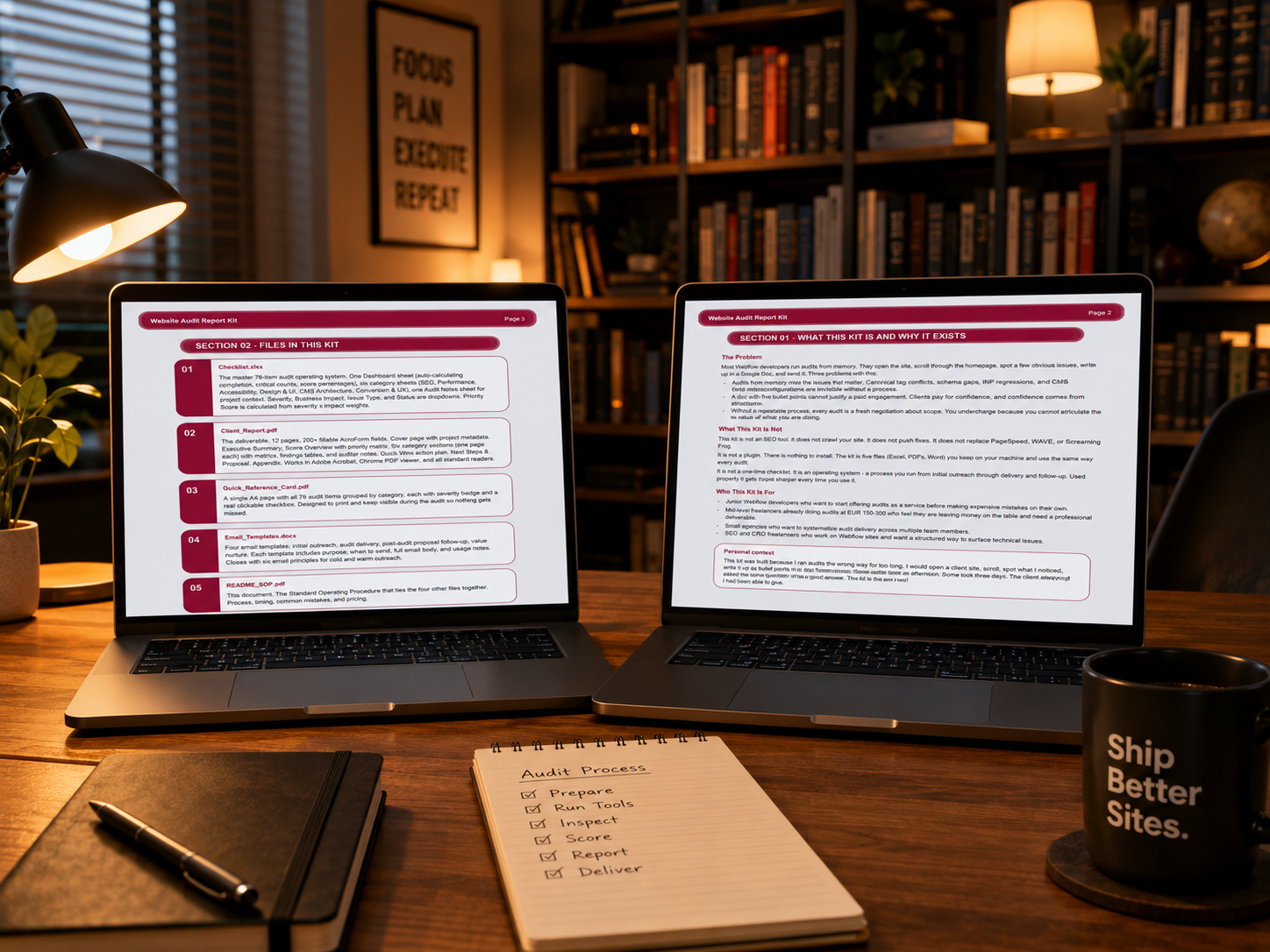
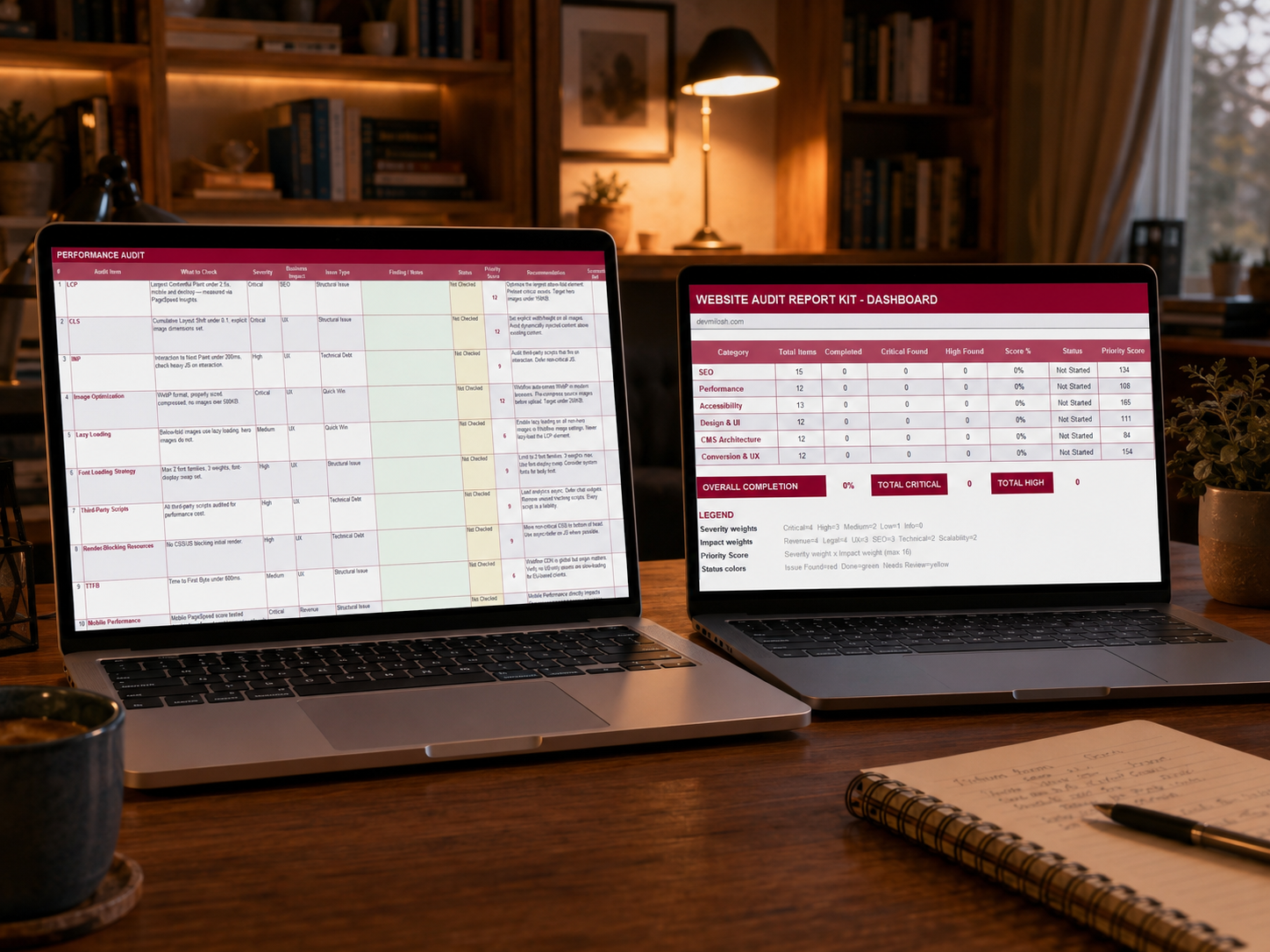
Four years and dozens of audits later, I packaged everything I learned into a kit: a 76-item Excel checklist with auto-priority dashboard, a 12-page fillable Client Report PDF, a printable Quick Reference Card, four email templates for outreach and follow-up, and a full SOP with timing benchmarks and pricing models.
It's the kit I wish someone had handed me before that first €120 audit.
If you're already doing Webflow audits and feel underpriced, or you're new to audits and want to start without making expensive mistakes — the kit is on Contra:
You can keep using the framework in this guide for free. If you want the executable version of it — the checklist, the report template, the email scripts, the SOP — that's what the kit is for.
.png)
.png)
.png)