REACH ME
(+381 ) 65 - 265 - 8527
HI@DEVMILOSH.COM
MY RESUME

Every freelance web designer knows this feeling.
You've signed the contract. The deposit is in. You're excited to start. You open a blank Figma file, ready to build something great - and then you wait.
You wait for the homepage copy. You wait for the team bios. You wait for the logo in the right format. You wait for the client to "check with the team" about what their value proposition actually is.
One week passes. Then two. Then you send a polite follow-up email. Then another. And somewhere in week three, you're still staring at that blank Figma file.
This is the most common reason web projects run over schedule - and it has nothing to do with your skills, your process, or your client's intentions. It happens because no one ever gave the client a clear, structured way to gather and deliver their own content.
That's exactly what the Website Content Questionnaire solves.
Let's be honest about what content delays actually cost you.
If you bill at €50/hour and a project stalls for two weeks, you've lost the opportunity to start - and potentially finish - another project in that time. You're holding a slot open for a client who isn't ready. Your cash flow slows down because you can't invoice for work you haven't done. And the longer the delay, the more pressure builds on the back end of the project, which means rushed work, more revisions, and a launch that feels chaotic instead of planned.
The average web project involves collecting content from at least four or five distinct areas: the homepage messaging, the about page story, service descriptions, contact information, and SEO metadata. Most freelancers try to gather this through back-and-forth emails, Notion documents thrown together on the fly, or worse - collecting it page by page as the design progresses.
None of these approaches work consistently. What works is sending a structured, professional kit to your client before the project starts - one that walks them through exactly what to gather, in what format, and why it matters.
The Website Content Questionnaire is a kit of five structured PDF documents that you send to your client immediately after signing the contract. Each document covers one area of content that your client needs to gather before you can start building.
It's not a generic brief template. Every field is written in plain language that a non-technical client can understand. Every section includes helper text that explains what you're asking for and why. Every document ends with a checklist so the client knows exactly when they're done.
Here's what's inside.
The homepage is where most projects get stuck because clients have no idea how to write a headline, define a value proposition, or describe their ideal customer in plain language.
This document guides them through it step by step. It asks for the main headline as a benefit statement, not a feature list. It prompts them for their value proposition across three specific questions - what they do, who it's for, and why someone should choose them over the alternative. It collects social proof in a structured format: exact testimonial quotes, names and titles, stats, and client logos. And it asks for hero image direction - mood, subject, and what to avoid - so you're not guessing what they want visually.
The about page is the second most visited page on most websites and the one clients find hardest to write. That's because nobody ever asks them the right questions.
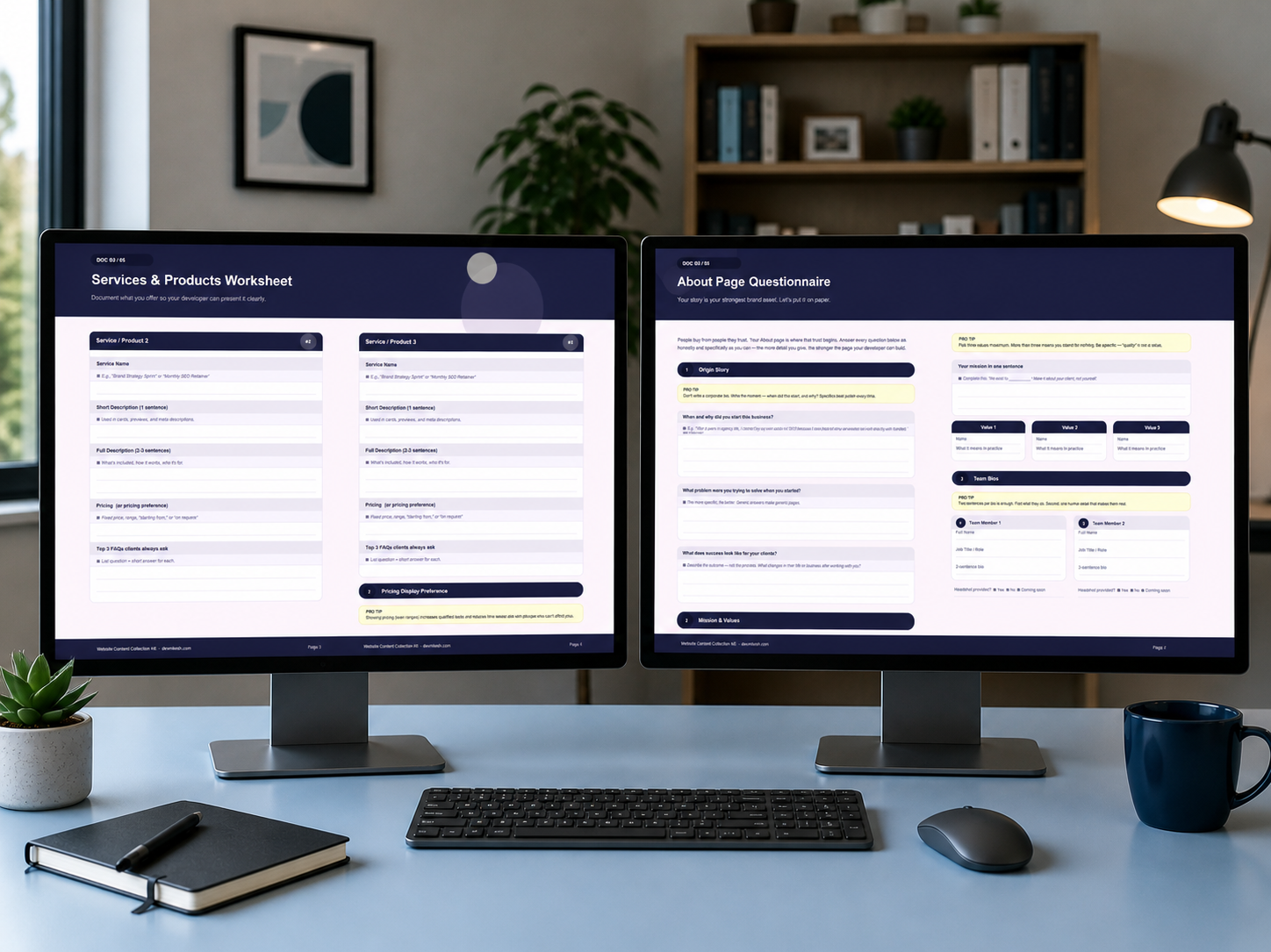
This document starts with the origin story - when and why they started the business, what problem they were trying to solve, and what success looks like for their clients. It then moves to mission and values, with a deliberate constraint: three values maximum, each with a plain-language explanation of what it means in practice. Finally, it collects team bios in a structured format - name, role, a two-sentence bio, and headshot availability.
If your client has more than one service, this is where things usually fall apart. They know what they offer, but they've never had to describe it to a developer in a structured way.
This document gives each service its own block with five fields: the service name, a one-sentence short description for cards and meta tags, a two-to-three sentence full description, a pricing preference, and the top three FAQs clients always ask. There's also an optional tiered pricing table for clients who offer packages, which your developer can use to build a comparison section or pricing cards.
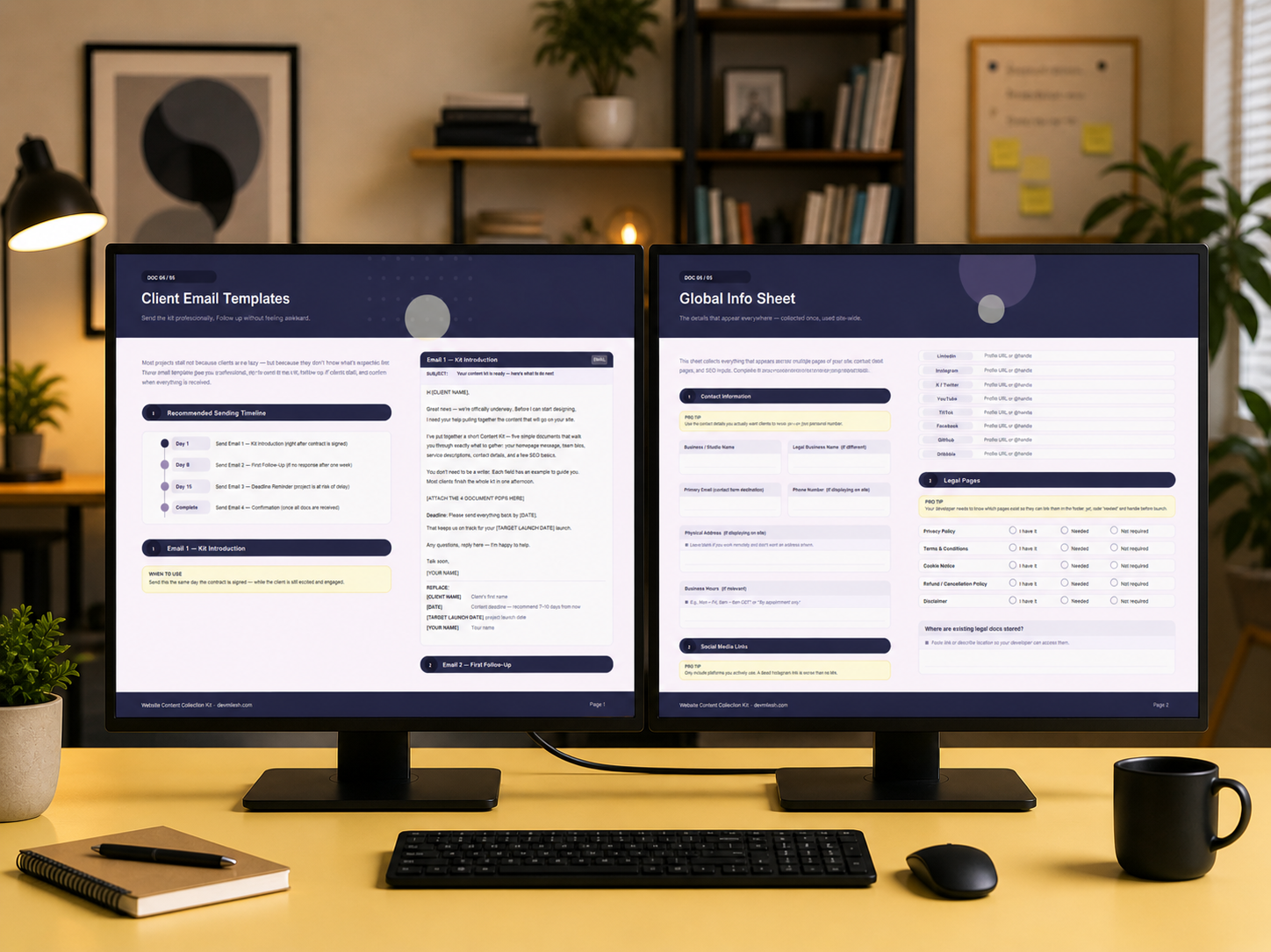
This is the document that saves you the most time on the technical side of the build. It collects everything that appears across multiple pages of the site - contact details, social media links, legal page status, and SEO inputs for every page.
The SEO section is particularly useful. Most clients have never written a page title or meta description in their life. This document explains the character limits, gives an example of what good looks like, and provides a row for every page on the site. You get usable SEO inputs before you build a single page, not as an afterthought after the site is live.
This document is for you, not for your client. It contains four email templates that handle the entire content collection process from start to finish.
Email 1 is the kit introduction, sent the same day the contract is signed. Email 2 is a friendly follow-up for day eight if you haven't heard back. Email 3 is a firm deadline reminder for day fifteen, written to be direct without being rude. Email 4 confirms receipt of all documents and sets up the next phase of the project.
Each email has a placeholder legend so you know exactly what to swap out before sending. The tone is calibrated - professional, clear, and never passive-aggressive.
The workflow is simple.
You sign the contract. That same day, you open Email 1 from Document 05, fill in the client's name, the content deadline, and your name, attach Documents 01 through 04 as PDFs, and send. That's it.
If the client responds and delivers everything - great. You start building on schedule. If they go quiet, you send Email 2 on day eight. If they're still quiet on day fifteen, you send Email 3. When everything arrives, you send Email 4 within 24 hours to confirm receipt and set expectations for what comes next.
Most clients complete the entire kit in one afternoon. That's not a guess - it's what happens when you give people a clear structure instead of an open-ended request.
The Website Content Questionnaire is designed for freelance web designers and Webflow developers who work on client projects - particularly those who are tired of projects stalling because of missing content.
It's also useful for small agencies that have a repeatable project process and want to standardize their content collection across the whole team. Instead of every designer handling client content differently, everyone sends the same kit and follows the same timeline.
It works for any kind of web project: marketing sites, portfolio sites, SaaS landing pages, service business websites, and e-commerce stores where the client is responsible for their own copy.
I built this kit because I kept running into the same problem on every project.
I'd finish the design phase ahead of schedule, ready to hand off to development, and find myself waiting two more weeks for the client to send the copy. Not because they didn't care - they did. But because writing website content is genuinely hard if no one has ever walked you through it, and most clients have never been given a structured process for doing it.
I started sending a rough version of these documents to clients and the difference was immediate. Projects moved faster. Clients felt more confident in what they were providing. The content I received was more complete and more usable. And I stopped losing hours to follow-up emails.
After refining the documents across multiple projects, I packaged them into a kit that any freelancer or agency can buy once and use on every project from that point on.
The kit includes six files delivered as a ZIP download immediately after purchase:
All documents are professionally designed, consistent in style, and written in language your clients will understand. No jargon. No vague prompts. Just clear questions with examples that make it easy to fill in.
The Website Content Questionnaire is available on Contra.
If you've ever lost a week waiting on client content, this kit pays for itself on the first project you use it on.
.png)
.png)
.png)