REACH ME
(+381 ) 65 - 265 - 8527
HI@DEVMILOSH.COM
MY RESUME

If you are a freelance web designer or web developer, you already know that winning a client is only half the battle. The other half happens before the project even begins — in the way you present yourself, the questions you ask, and how organized you look from the very first touchpoint.
A professional website proposal template is one of the most underrated tools in a freelancer's business. Most designers treat proposals as an afterthought. They send a rough PDF, a Google Doc, or a Notion link, and then wonder why clients go quiet. The problem is rarely the price. It's the impression.
This guide covers everything you need to know about web design proposals — what they are, what they should include, how to structure them, and how to use a ready-made website proposal template to close more clients without spending hours building documents from scratch.
A website proposal template is a structured document that a web designer or developer sends to a potential client before a project begins. It outlines who you are, what you do, how you work, and what the client can expect from working with you.
A good web design proposal does two things at once. First, it sells you. It presents your studio, your work, your process, and your credibility in a way that makes the client feel confident they are hiring a professional. Second, it gathers information. It asks the client everything you need to know before you can quote accurately, start the project, and set realistic expectations.
Most proposal templates on the internet do one or the other. Very few do both.
Here is something that most freelancers learn the hard way.
Clients do not always choose the best designer. They choose the one who made them feel most confident. And confidence is built through first impressions — through the quality, completeness, and professionalism of what you send before the first call even ends.
A blank Google Form does not build confidence. A Notion page with scattered questions does not build confidence. A PDF you threw together in Canva six months ago, still with a placeholder where the client name should be, does not build confidence.
A polished, well-structured, 30-page proposal document that walks a client through your studio, your process, your past work, and then asks them exactly the right questions — that builds confidence.
That is the entire point of a professional website proposal template.
A strong web design proposal has two distinct sections: the studio presentation and the client questionnaire. Here is what each should cover.
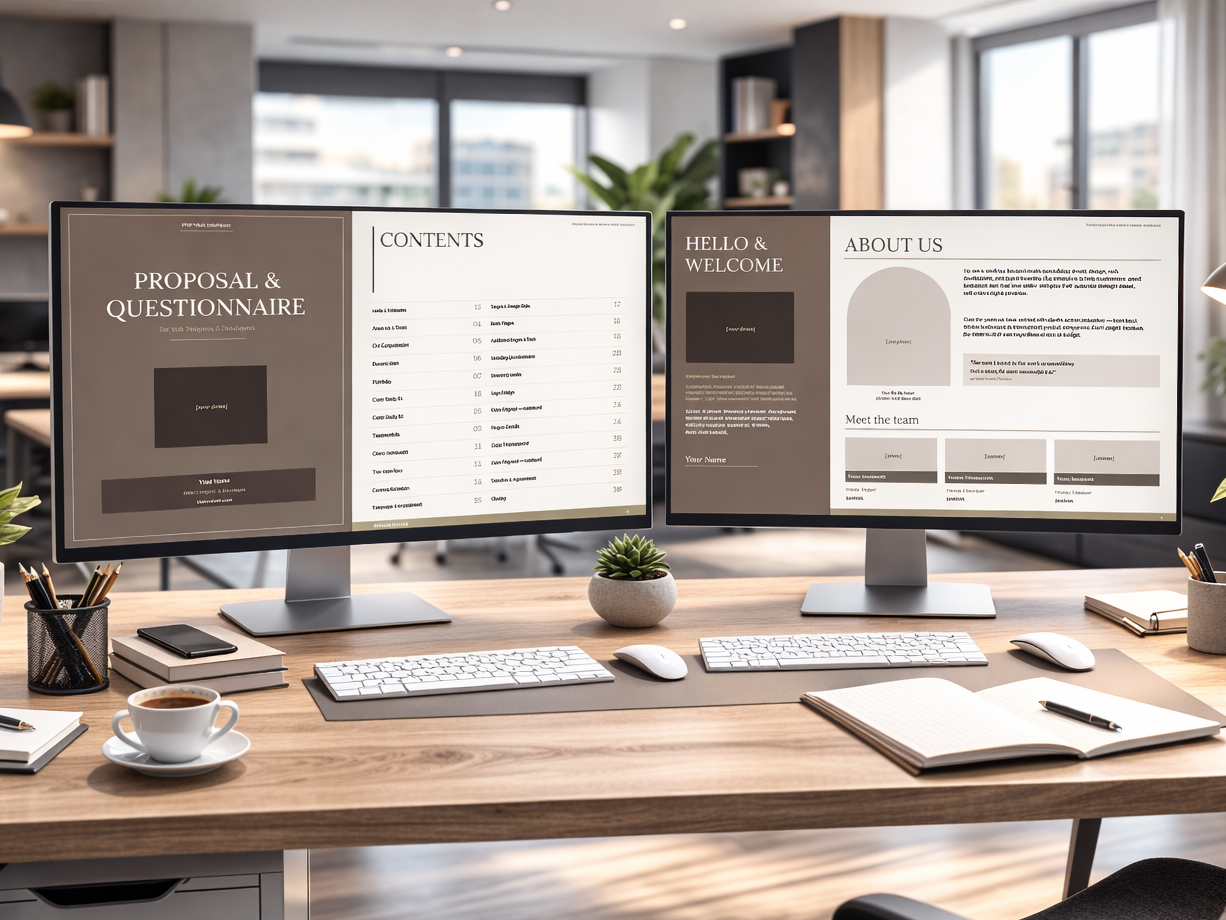
Cover pageYour name, studio name, title, contact details, and a professional photo. The first thing the client sees. Keep it clean and branded.
Table of contentsA structured table of contents signals immediately that this is a serious, organized document. Clients notice this before they read a single word.
Hello & WelcomeA short personal introduction. Who you are, why you do this work, and what working with you looks and feels like. This is not a sales pitch — it is a human connection.
About Us & TeamYour studio background, how long you have been operating, and who is on your team. Include roles, photos, and email addresses for each team member. Clients want to know who they are working with.
Services & CompetenciesA clear breakdown of what you offer. Web design, web development, marketing, SEO — whatever applies. Keep descriptions concise and benefit-focused.
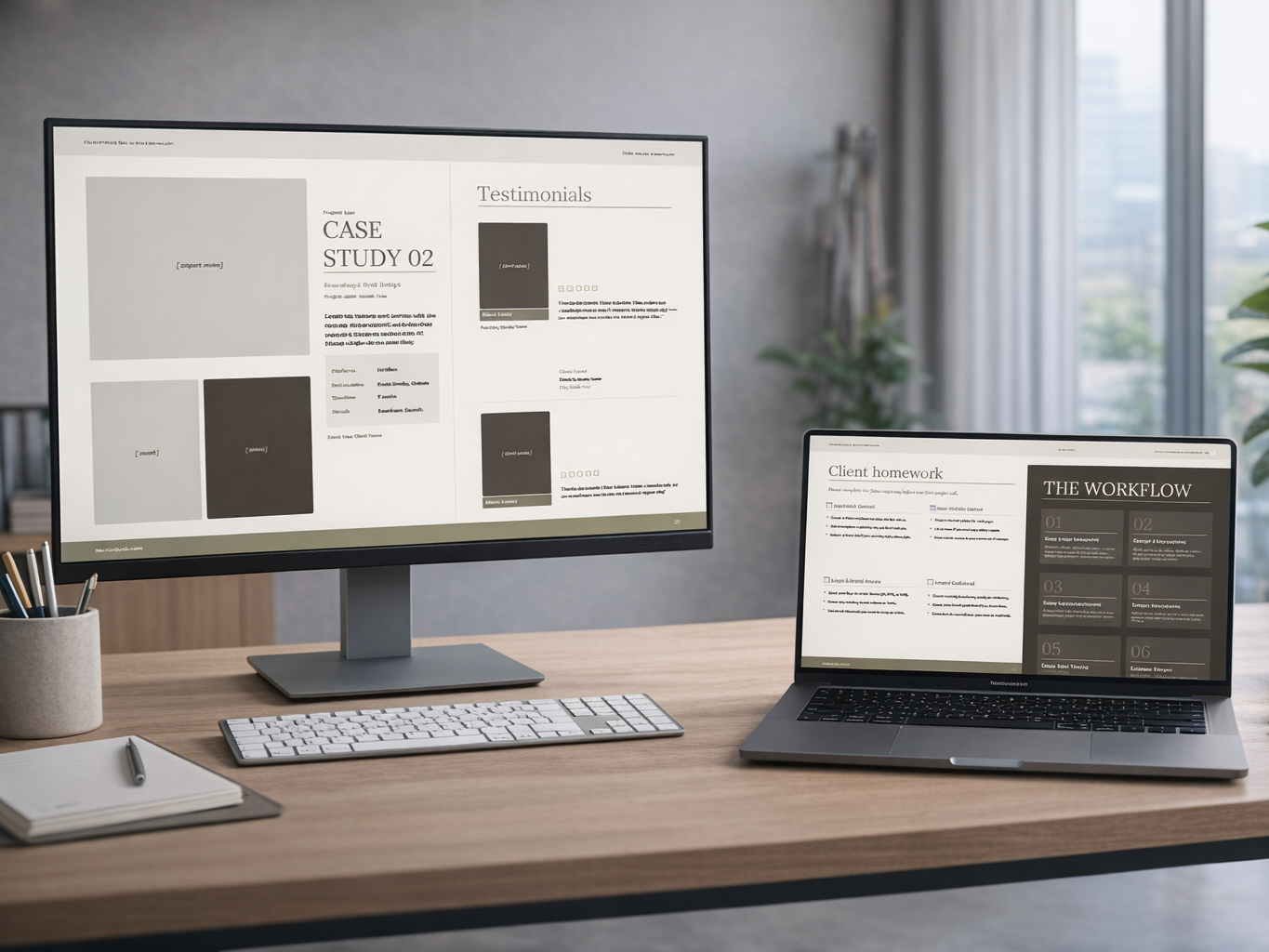
Portfolio & Recent WorkShow your actual work. Include project screenshots, client names, and URLs. If you have case studies with measurable results — bounce rate reductions, conversion increases, traffic growth — include them here. Numbers build trust faster than anything else.
TestimonialsTwo or three genuine client testimonials with names, companies, and photos. Social proof at this stage does a lot of the selling for you.
Client HomeworkA pre-project checklist that tells the client exactly what they need to prepare before kick-off. Inspiration board, brand assets, website content, deadlines. Setting this expectation early saves weeks of back-and-forth later.
Project WorkflowA breakdown of your process, phase by phase, with estimated durations. Analysis & Discovery, Design & Prototyping, Development & Build, Content Integration, QA Testing, Launch & Handover. Showing clients your process removes uncertainty and positions you as a structured professional, not a freelancer who wings it.
Communication PolicyBusiness hours, response time, preferred contact method, and how revision requests are handled. Setting these expectations upfront prevents 90% of the friction that kills client relationships.
This is the section most freelancers skip or underestimate. A thorough client questionnaire is the difference between starting a project with clarity and starting a project guessing.
A well-built web design questionnaire should cover:
General project informationCompany name, address, contact details, existing website URL, current platform, and desired launch date.
Project goalsIs this a new website, a redesign, a performance improvement? What does the client actually want to achieve? Budget range and project phasing.
Target audienceWho is the client's customer? Age range, audience type (B2B or B2C), ideal client description, key competitors, and unique selling proposition.
Website pagesA complete checklist of every standard page type — home, about, services, portfolio, blog, pricing, contact, FAQ, and more. The client marks what they need. This alone prevents scope creep on every project.
Technical requirementsCMS integration, animations, e-commerce, GDPR compliance, analytics setup, multi-language support, booking systems, member areas. Again, a checklist. The client marks what applies.
Branding questionnaireThe meaning behind the business name, founding story, long-term goals, current challenges. These questions reveal the brand personality and help you make design decisions that actually align with the client's identity.
Brand wordsA list of 80+ personality adjectives — from Bold and Energetic to Minimal and Trustworthy. The client highlights all that apply, then narrows down to five. This is one of the most useful exercises in any branding or web design project.
Logo design preferencesFont style preferences, graphic elements, usage context, and existing brand assets.
Marketing and SEOHow people currently find the client's website, marketing channels, social media platforms, most popular pages, target keywords, and competitors. Meta title and meta description fields so you have SEO inputs from day one.
Color directionA palette of 24 professional color swatches with names and HEX codes, spread across two pages. The client checks their preferred colors directly in the document. This replaces three email threads trying to explain "something warm but not too orange."
Project detailsDeadline urgency, budget range, design level (basic, mid-range, premium), browser and device optimization preferences, accessibility requirements.
Project agreementA timeline table, client name and signature fields, designer name field, and a notes section. The proposal ends with a signed agreement built in.
There is no shortage of free web design proposal templates on the internet. Canva has dozens. HubSpot has one. Every proposal SaaS tool has their own version.
Most of them share the same problems.
They are generic. They are not built for web designers or web developers specifically. They cover scope, timeline, and pricing — the basic structure of any services proposal — but they do not include the deep, project-specific questions that a web designer actually needs answered before starting work.
They have no design. A plain Word document or a generic Google Doc does not make a strong visual impression. For a designer, this is particularly damaging. You are selling your ability to create compelling visual experiences. Your proposal is the first proof of that ability.
They are one document. Either a proposal or a questionnaire, never both. This means you are always chasing information in follow-up emails, Slack messages, or a separate form that clients forget to fill in.
They require ongoing subscriptions. Most proposal SaaS tools — Proposify, PandaDoc, Better Proposals — charge monthly fees for something you should own outright.
A purpose-built, downloadable website proposal template solves all of these problems at once.
Once you have a template, making it yours takes less time than most people expect. Here is the process:
Step 1 — Update your identityOpen the editable file (DOCX is the easiest format for this). Use Find & Replace to swap every instance of "Your Name," "Your Studio Name," "yourwebsite.com," and "contact@yourwebsite.com" with your real details. This takes about two minutes and updates every page at once.
Step 2 — Add your portfolioReplace the project screenshot placeholders with your actual work. Choose three to six projects that are most relevant to the type of client you want to attract. Include the client name and URL under each one.
Step 3 — Write your case studiesPick your two best projects. For each one, write a short description of the challenge, the solution, and the results. Platform used, deliverables, timeline, and a measurable outcome. If you do not have measurable outcomes yet, focus on the quality of the process and the client satisfaction.
Step 4 — Add your testimonialsTwo or three real testimonials. Use the client's full name, company, and photo if they are willing to share one. Short and specific is better than long and vague.
Step 5 — Export to PDFFile → Save As → PDF in Word, or File → Download → PDF in Google Docs. This is the version you send to clients.
Step 6 — Send before the first callEmail the PDF to your prospect before your initial call. Ask them to review the presentation section and fill in the questionnaire section before you speak. By the time you get on the call, they have read your proposal, seen your work, and answered most of the questions you would have spent 45 minutes asking.
Sending the proposal is as important as building it. A few principles that make a difference:
Send it before the call, not after. Most freelancers send a proposal after a discovery call as a follow-up document. Flip this. Send it before. Use the call to discuss what they filled in and clarify any answers, not to gather information you could have collected in advance.
Keep the email short. One paragraph. "Hi [Name], I've attached our Proposal & Questionnaire document. The first half introduces our studio and process. The second half is a short questionnaire — if you could fill it in and return it before our call, it'll help us make the most of our time together. Looking forward to speaking on [date]."
Follow up once. If they do not return the questionnaire within three days, send one reminder. If they still do not respond, that tells you something useful about how organized they are as a client.
Use the questionnaire as a filter. Clients who do not fill in the questionnaire before a call are often the same clients who delay decisions, provide incomplete feedback, and extend timelines. The questionnaire is not just a data-gathering tool. It is a qualification tool.
Different situations call for different formats. Here is how to think about it:
PDF is the primary client-facing format. It is pixel-perfect, print-ready, and if your template has interactive AcroForm fields, the client can fill it in directly in free Adobe Acrobat Reader — without printing, scanning, or any additional software.
DOCX is the format you use to customize the template. Open it in Word or Google Docs, make your edits, and export to PDF. It is not the format you send to clients.
PPTX is useful for live presentations. If a client prefers a walkthrough call, open the presentation version in Google Slides or PowerPoint, share your screen, and take them through it slide by slide. Every questionnaire field is still editable so they can type directly into the slide.
HTML is the most flexible option. It works in any browser without software. If your template has proper form fields with named attributes, clients can fill in the entire questionnaire in their browser and export their answers as a text file with one click — no server, no submission, no login.
The best website proposal template gives you all four formats so you can use whichever fits the situation.
How long should a web design proposal be?Long enough to cover everything, short enough to get read. A proposal that doubles as a studio presentation and a client questionnaire justifies 25–30 pages. A proposal that is just a scope and price document should be 4–6 pages maximum.
Should I charge for the proposal?For standard projects, no. The proposal is part of your sales process. For complex, multi-phase projects where the discovery work itself requires significant time, some designers charge a discovery fee. This is rare and should be reserved for enterprise-level engagements.
When should I send the proposal?Before the first call, not after. Most freelancers treat the proposal as a post-call document. Sending it before the call changes the dynamic entirely — the client arrives prepared, informed, and having already invested time in your process.
What should I include in the project agreement section?Client name, designer name, date, and a signature or initials field. Keep it minimal at the proposal stage. A full legal contract comes after the proposal is accepted. The agreement in the proposal is an intent-to-proceed document, not a binding contract.
How do I handle clients who want changes after signing?Your communication policy section should address this. State clearly that all revision requests must be submitted in writing and that changes outside the agreed scope are quoted separately. Include this in the proposal so clients read it before they sign, not after a dispute arises.
Should I send the same proposal to every client?The structure stays the same. The cover, your portfolio, your case studies, and your questionnaire are consistent. What changes is the cover letter and the opening of the questionnaire — personalize these to reference the client by name and acknowledge their specific situation.
Building a professional website proposal from scratch is a multi-week project. You need to design 25–30 pages with consistent typography, color palette, and layout. You need to write content for every section. You need to add interactive form fields to the PDF, clickable text boxes to the PPTX, and form elements with proper naming conventions to the HTML. You need to write documentation explaining how to use all of it.
Most freelancers either never do this, or spend time doing it that would be better spent on client work.
A purpose-built website proposal template costs less than one hour of your billable rate, is ready to send in 20 minutes, and pays for itself the first time a client returns a completed questionnaire before your kick-off call.
If you are ready to replace the Google Form and the blank Word document with something that actually represents the quality of your work, the template is available here:
30 pages. 5 formats. 219 fillable fields. Built for web designers and Webflow developers. Customize once, send to every client, use forever.
.png)
.png)
.png)